Thursday, February 11, 2016

30 before 30

About a year ago I was having a moment of "what are you doing with your life?!" Over a glass of wine (orbs few) and ended up making this list of things to do before I turn 30. I turn 30 in about 6 months so a lot of these might not get done but I am proud of what I've done so far! Get inspired and make a list and set some goals! 

✔️Make a piece of art with paint nite
✔️Take a dance class
✔️Do a handstand against a wall
Cartwheel!
Learn to drive stick shift (manual)
✔️Go to Vegas
Shooting range 
Touch a butterfly
✔️Watch the sunrise
✔️Visit Grand Canyon 
Cliff jump
Tattoo
✔️Bonnaroo
Ultra 
Burning man  
Half marathon 
✔️5k
✔️Drink a bottle of wine
✔️Finish a craft bottle of beer 
✔️Swim with whale sharks
Learn to skate 
Watch all the bond movies
Get your fortune read 
Try skiing again 
Learn a song with babe and sing it
Dye my hair crazy color 
✔️Drink alone and relax 
✔️Get married  
Have a baby
Have a big 30s bday bash

Monday, February 1, 2016

Blogging Fail

Well this didn't go as planned! My idea to blog all of my educational creativities and ideas failed. Wah wah. This means I must learn from my mistakes and improve. I think my biggest problem was that I had lots of free time and this romantic idea that I can post multiple times a week, until of course the school year started. That's when reality hit and posting ended. 

So here come some new goals for the blog and of course I'll keep them simple. 

1.  Blog once a week! Simple enough. Pick something I like about education or life and talk about it. 

That's it, should be easy right? 

Friday, September 18, 2015

Augmenter App

The school year has started and it's been crazy already! always feel like I am on the go, energizer bunny style!

Anyway, I wanted to talk about an ipad app that is absolutely incredible. Its called Augmenter. It has 3-D simulations of various objects like the human brain, dinosaurs, flowers, etc. which works out well with my Biology students. I have only used the science portion of the app but it has other features for math and history. My favorite one is the human brain which is an important part of the end of course exam my students take. It helps with labels, they can take the brain apart, make certain parts invisible, etc.

It offers a really cool feature where you place a "marker" on the table and it gives you the impression of having the item on the table in front of you in 3D. Similar to the Nintendo DS Augmented Reality Cards where you scan them with your Nintendo DS and you see a character appear and interact on your screen on top of the card.

There is a free version of the app with some of the explorations for free, but the paid version offers more than 300 models to use. I currently only use the free one because most of what I want to demonstrate is easily done on the free app and projected on the big screen. 

By far a very interesting way to learn various concepts and a definite thumbs up!

Check out the demo video below :)


Wednesday, September 2, 2015

The Fairchild Challenge! 2015-2016

Since I started at the new middle school I am at, I have been a part of the Fairchild Challenge. It's an environmental competition between schools in the district where we complete different events or challenges and receive points for it. This will be my 3rd year in the competition and also running the program at my school site. The students love it and the program has some remote locations throughout the US and internationally where some of the challenges are open to those schools known as the Global Challenge.
This years focus is on the Voyage of plants! We will be working together with NASA on challenges that focus on cultivating edible plants in small spaces and indoors to promote the research of growing in space. Here are a few pictures below of some of the set ups we will be using this year and of course of myself in front of a sign! 
check out the Fairchild Challenge! 


Saturday, August 29, 2015

Classroom reveal! 2015-2016

Hello! I knew when classes started posting would be difficult! I wanted to post my classroom for this year. It's dinosaur theme and it feels inviting! Our overall school theme is "Discovery 'A' New World" and we decided to make it centered around Jurassic Park. All of the teachers have cool name plates in front of the classroom that are Jurassic Park theme. 

 I decided to put up some of my posters and decorations rather than ALL of them like I have done in the past. I felt that with all them up it looks like someone threw up information everywhere. Very messy. I tried my best to make this years walls look organized. I also made vines to give it a bit of a jungle feel.


I also have a biology word wall with QR codes that I created myself. The kids love that it is interactive and it helps them remember the meaning of many of the words. These are the words that the district provided my school, but of course there are many other ones that can be used. You can buy them at my tpt store. 

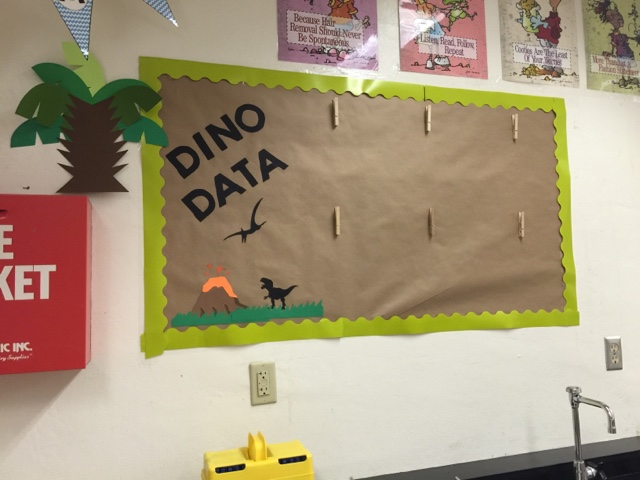
This is where the data wall is and where I place information after they take their test! Data driven instruction is a huge part of our classrooms and I like to show the kids how the classroom as a team is doing on their concepts. It sparks a little competition as well between class periods to do better. 


I have labels for each lab station that are Dino themed as well and you can find them on my tpt store! I have 8 lab stations and I have them available in dinosaurs that are colored and those that are black and white.


I made cute cutouts of dinosaurs to place around the room. The kids so far seem to enjoy it and like the simplicity of it. I teach Biology to 2 classes a day and it fits nicely into some of what we are learning. 


I also teach Physical Science and I can't leave those kids out! I have a wall with some educational posters and vocabulary words that they can reference for concepts we focus on.


I am excited for this year! So far it has been a great first week!


Friday, August 14, 2015

Interactive Science Notebooks!


I can't believe I am back at work next week! Monday is our new student orientation where we introduce new students to the school and give them a tour. Then Tuesday and Wednesday is set up day! Thurs-Fri ALL DAY MEETINGS! I think I might need some stretch breaks throughout the day! Anyways, because we are starting so soon, I started to buckle down and plan out the first few weeks (maybe months lol). 

Last year I used interactive notebooks for the first time. I have done lab notebooks before, but it was only for labs and it stayed in the classroom. I wanted to try out having everything in one spot. I think last year was a success with a few things I felt worked and didn't work. 

this years INB: Teacher Editions, planning sheets, a foldable on units

what worked:
  • organized table of contents was great! when the students actually had their pages numbered it was perfect. Some even went a step further and would put a string as a bookmark or a post it tab so I knew where the most recent assignment was. 


  • course guide in the front of the book - I had a folded paper with all the info for the class in like a mini guide where they can refer to when they needed help! I forgot where I got the template from but the person who made it is amazing
  • storage pocket in the back - I made them create a pocket from some back pages to hold anything they did not finish in class to make sure it wouldn't get lost. It was magical. 

  • decorating - they were given creative freedom in decorating the notebook to show their personality. Mine was a little crazy I am not going to lie. 
  • which leads me to "teacher edition" - I made one at the same time the students did. Yes, I had to pretend to be a student and complete the assignment in the notebook just like they did. It was time consuming but worth it. If a student was absent, I showed them mine. It modeled what I was looking for and how it should be organized. It was fun!

what didn't work:
  • the vocabulary index was a fail. It was extremely time consuming and we had so many vocabulary words for both Biology and 8th grade science it was hard to keep up. Maybe in the future I can find an easy way to incorporate it.


  • Vocabulary pocket - we never made flash cards like I wanted because again lack of time so the pocket just sat there all sad. See, he looks very sad. 
  • Input/output on left and right side of the pages - I found that the students would run out of space and start writing on the back of the wrong side. Some wrote more than others and honestly, I felt like I was wasting paper if I didn't use both sides and let the notes run continually. I am tree loving hippie so I believe in saving trees. 
  • grading with stamps/stickers in the table of contents - this wasn't too bad, it was the collecting of the notebooks in my large class and stamping/grading the assignments that took lots of time. I need to make sure I did notebook checks on days they were working independently. In one class I had 40. yes 40. In a 55 minute class period. That was obviously graded over multiple days. I also felt that some assignments in the notebook deserved a separate grade rather than just having it averaged into the notebook grade.  
INB changes for the 2015-2016 school year: 

  • this year the students are going to have 2 composition notebooks. Our department orders enough to give the students their notebooks so they don't have to buy them and we get started from day one. 
    • one notebook for labs that stays in the classroom 
    • the other is an interactive notebook that stays with them at all times! 
  • planning sheets - I didn't use these last year but I created one that matches the table of contents to make it easier for me to use when I am planning and not mess up my teacher edition.
  • I am creating a teacher edition. again. I am teaching a new subject and one from last year so I need to make one to stay up to date. 
  • foldables and activities are going to get graded before we paste them into the notebook. I like this idea because I can give them a grade for assignments they worked hard on rather than having it grouped in with a notebook grade. I can have the notebook grade at the end of the 9 weeks worth a smaller grade. 
I am hoping the notebooks are successful again this year! 


Wednesday, August 12, 2015

Weekly Summer Link Up! Favorite Sites

good morning! I'm back for the next weekly summer link up! I am getting over a cold so I am stuck at home in pajamas until I feel better, which makes it a great time to blog. 


Here are my favorite sites in no particular order: 

Pinterest is my go to spot for ideas on everything you can imagine. Don't know what to cook? I pinterest. How should my bulletin board look this year? pinterest. You name it, its there and I absolutely love it. I also like to go back and see the pins I posted in the past kind of like a time capsule. 

Teachers Pay Teachers is amazing and dangerous because I end up spending wayyyyy too much money buying different activities or decorations. When I discovered it a few years ago I was in shock with what they had to offer teachers. I never thought I would have time to sell my resources on there, but I did it last year and I love being able to share with other teachers and help them out!

When I first started teaching a few years ago I found this site that is used as a classroom page but is setup similar to the interface of facebook. The kids love it and it has come a long way! there are so many features that can be included and used in the classroom. It stores your files in an unlimited cloud like service, you can connect google drive, students can have discussions, turn in assignments, etc.! the list goes on! I also use it for professional developments to communicate with other teachers and stay connected. 

Facebook
I just like facebook. I like to look at photos and to be honest its one of the only ways I can share photos with my grandma :), yes she has one too, and can use it better than I can!

what are your favorite sites?